
How to get a digest of the TikTok videos taking off in your niche, straight from Claude
Connect TrendGuru to Claude as an MCP server and get a table of the TikTok videos taking off in each niche you watch, plus a note on what to film.
What you get
One message to Claude returns a table of the videos taking off in every niche you watch, with the numbers behind each one, a short note on what they have in common and one idea to film.
What you need
- A TrendGuru workspace on a paid plan (Creator, Pro or Business)
- At least one niche in Trend radar that has already been scanned
- Claude with connectors
What you get
One message to Claude returns a table of the videos taking off in each niche you watch, with a short note on what they share and one idea to film. The table pastes straight into a planning document.
The data comes from Trend radar in TrendGuru. It watches the niches you pick on TikTok and YouTube Shorts and keeps videos from small accounts (100,000 followers or fewer) that suddenly got far more views than that account normally gets. Claude reads that list through MCP, a standard way to plug an outside service into an AI assistant so the assistant can call it.
Step 1. Make sure you have a niche
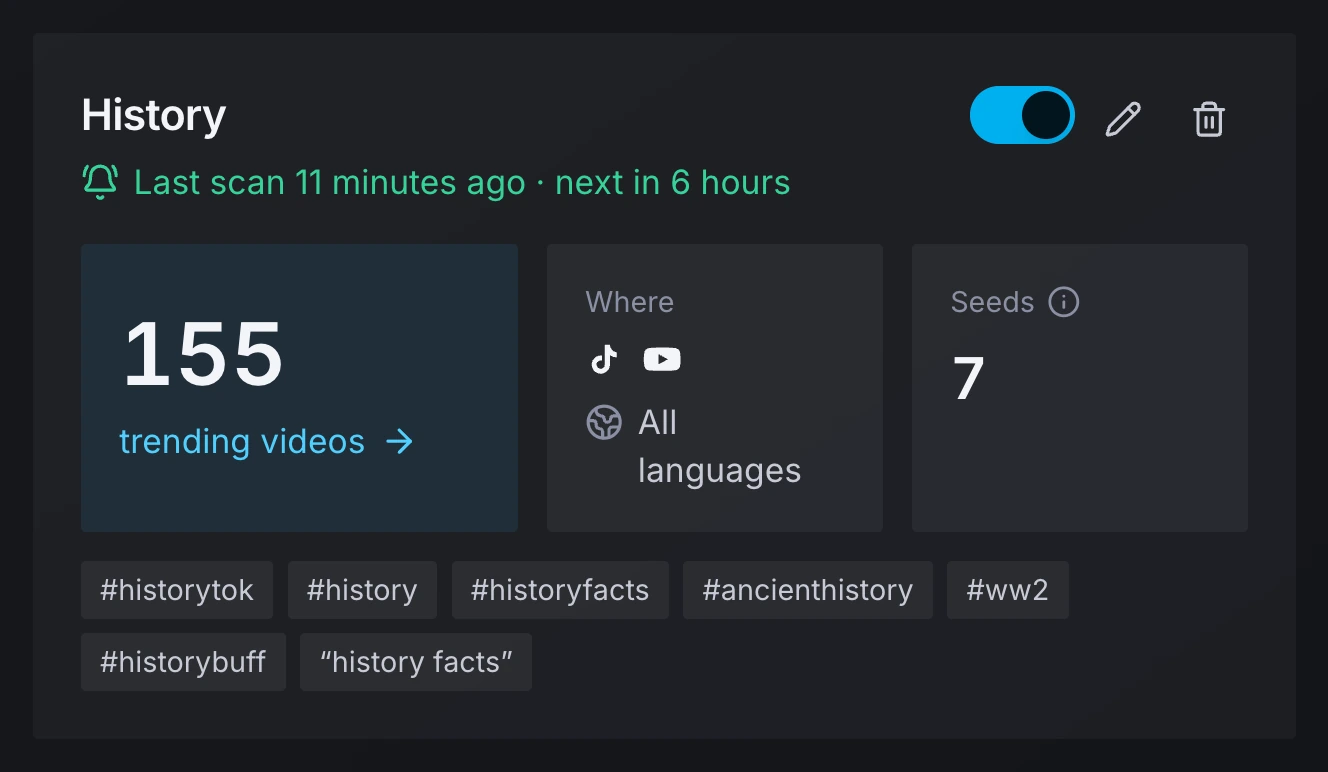
Trend radar needs at least one niche that has been scanned before Claude has anything to read. A niche is a name plus seeds: hashtags, search queries and TikTok sounds. Open Trend radar, then Niches. If the list is empty, add a niche: 20 presets are ready to use.
The example in this guide uses the preset "History", which had 155 trending videos after the last scan.
Step 2. Connect TrendGuru to Claude
You connect TrendGuru to Claude once, by pasting one address into Claude's settings. No key is pasted: Claude signs in with OAuth.
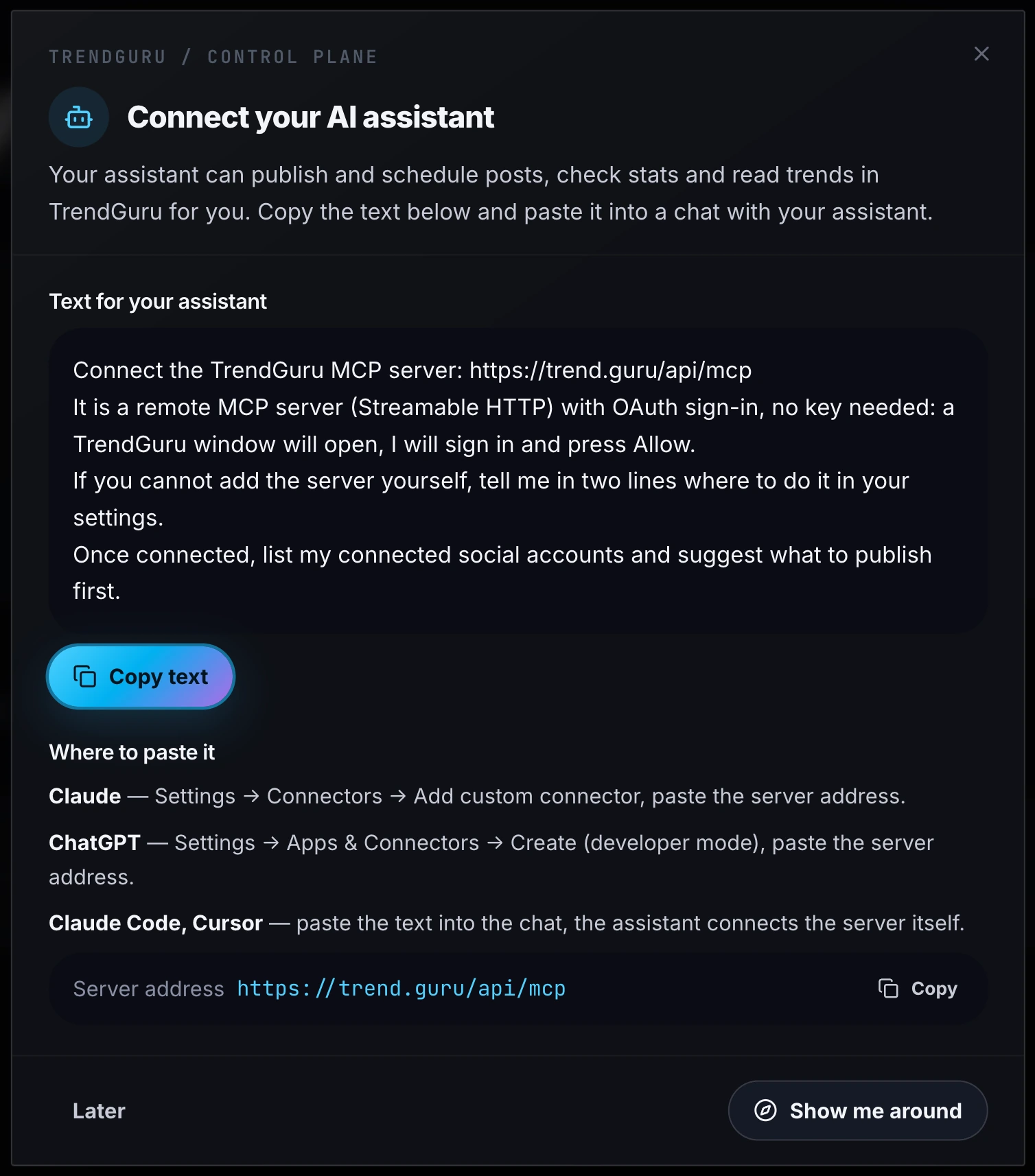
- In the TrendGuru dashboard open Developers, then Your AI agent. The window "Connect your AI assistant" shows the server address
https://trend.guru/api/mcpand where to paste it. - In Claude open Settings, then Connectors, then Add custom connector, and paste the server address.
- A TrendGuru window opens. Sign in, pick the workspace and allow access.
The connector now appears in Claude, and Claude appears in the dashboard under API keys, in the Connected apps list. Claude gets 14 tools and acts with your rights in the workspace you picked. Three of them read Trend radar, and they only read.

The same window covers ChatGPT (Settings, Apps & Connectors, Create in developer mode) and Claude Code or Cursor, where you paste the ready text into the chat. Claude Code also connects with an API key that has the trends:read scope:
claude mcp add --transport http trendguru https://trend.guru/api/mcp --header "Authorization: Bearer tg_live_..."Step 3. Send the message and allow two tools
Send one message that names TrendGuru and describes the table you want. This one was sent in a real run on 2026-11-11:
Use TrendGuru. Look at my trend niches and, for each niche, give me the 5 strongest TikTok videos that are still growing. Make a table: video (link), author, followers, views, views per hour, how many times above the account's normal. Under the table, write two sentences on what these videos have in common and one idea I could film this week.
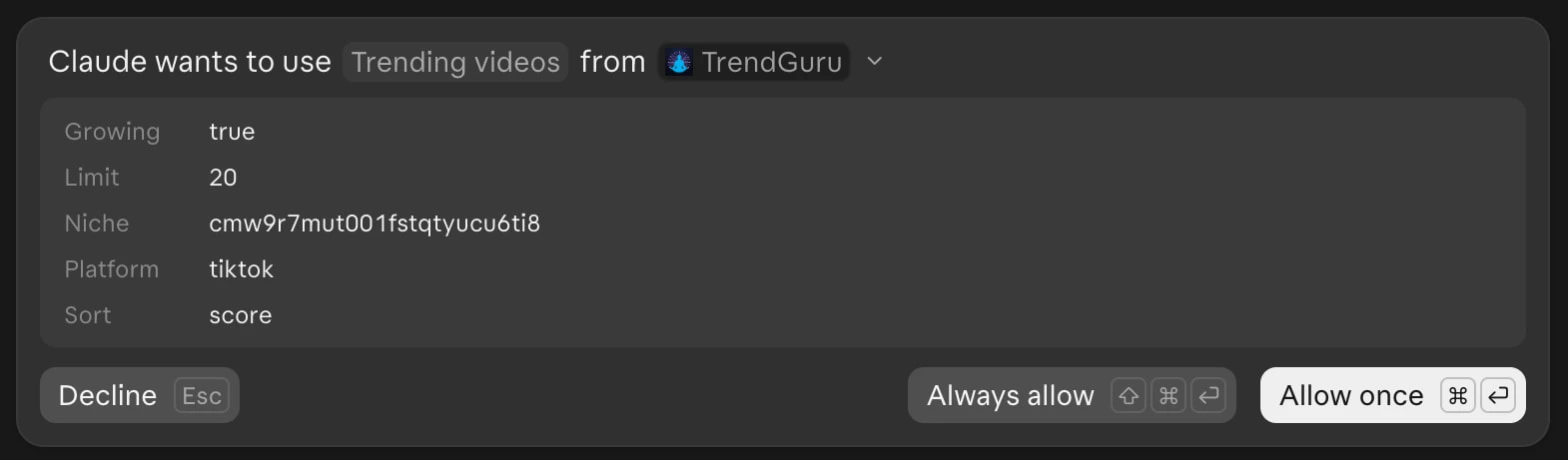
Claude asks for permission before each tool. First comes "Claude wants to use Trend niches from TrendGuru", then "Claude wants to use Trending videos from TrendGuru" with the parameters it chose: Growing true, Limit 20, the niche id, Platform tiktok, Sort score. Press Allow once or Always allow.
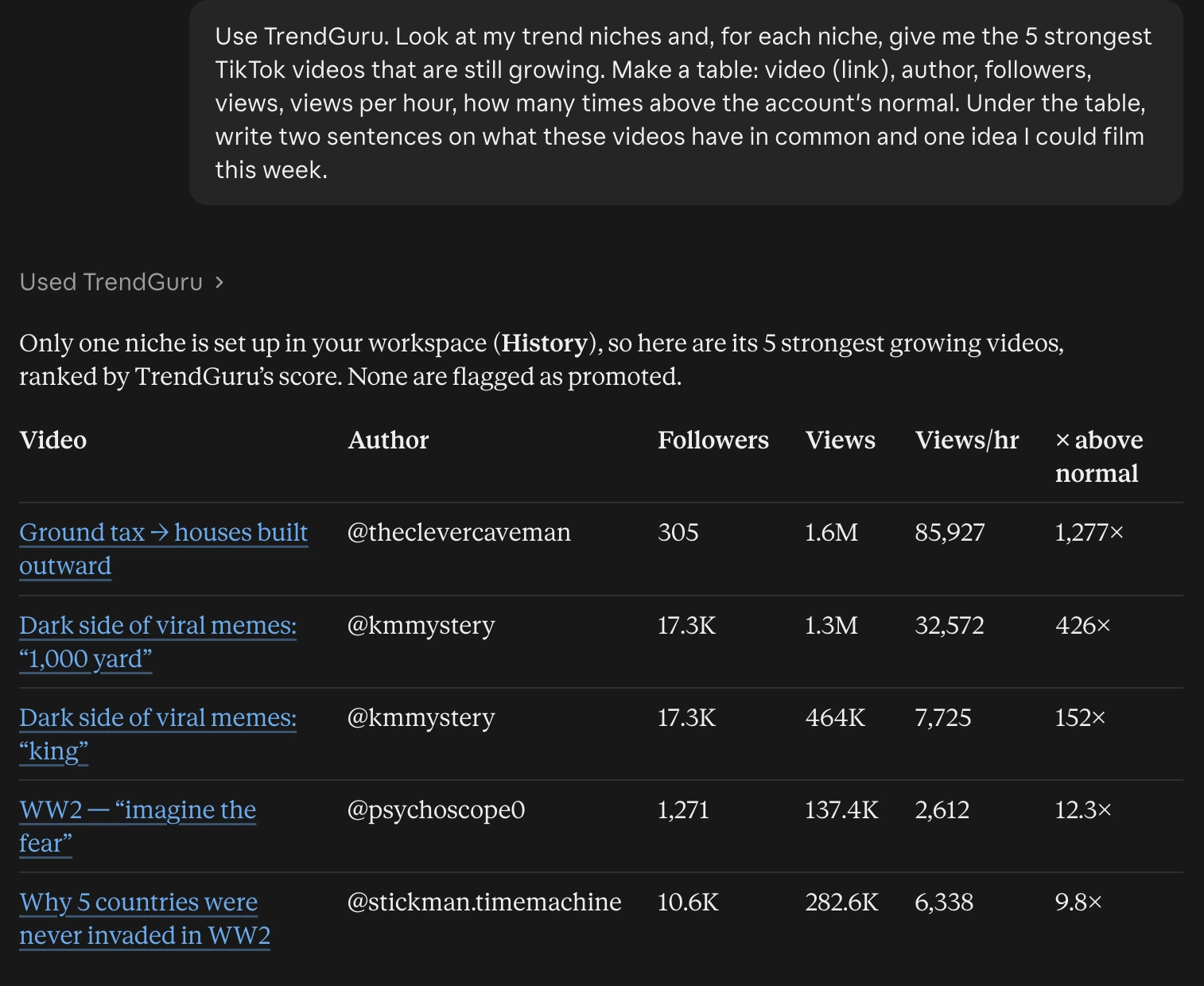
Then Claude answers with the table and the notes. The table below is the real one, with the links to the videos; the notes under it are shortened.
Only one niche is set up in your workspace (History), so here are its 5 strongest growing videos, ranked by TrendGuru's score. None are flagged as promoted.
| Video | Author | Followers | Views | Views per hour | Times above normal |
|---|---|---|---|---|---|
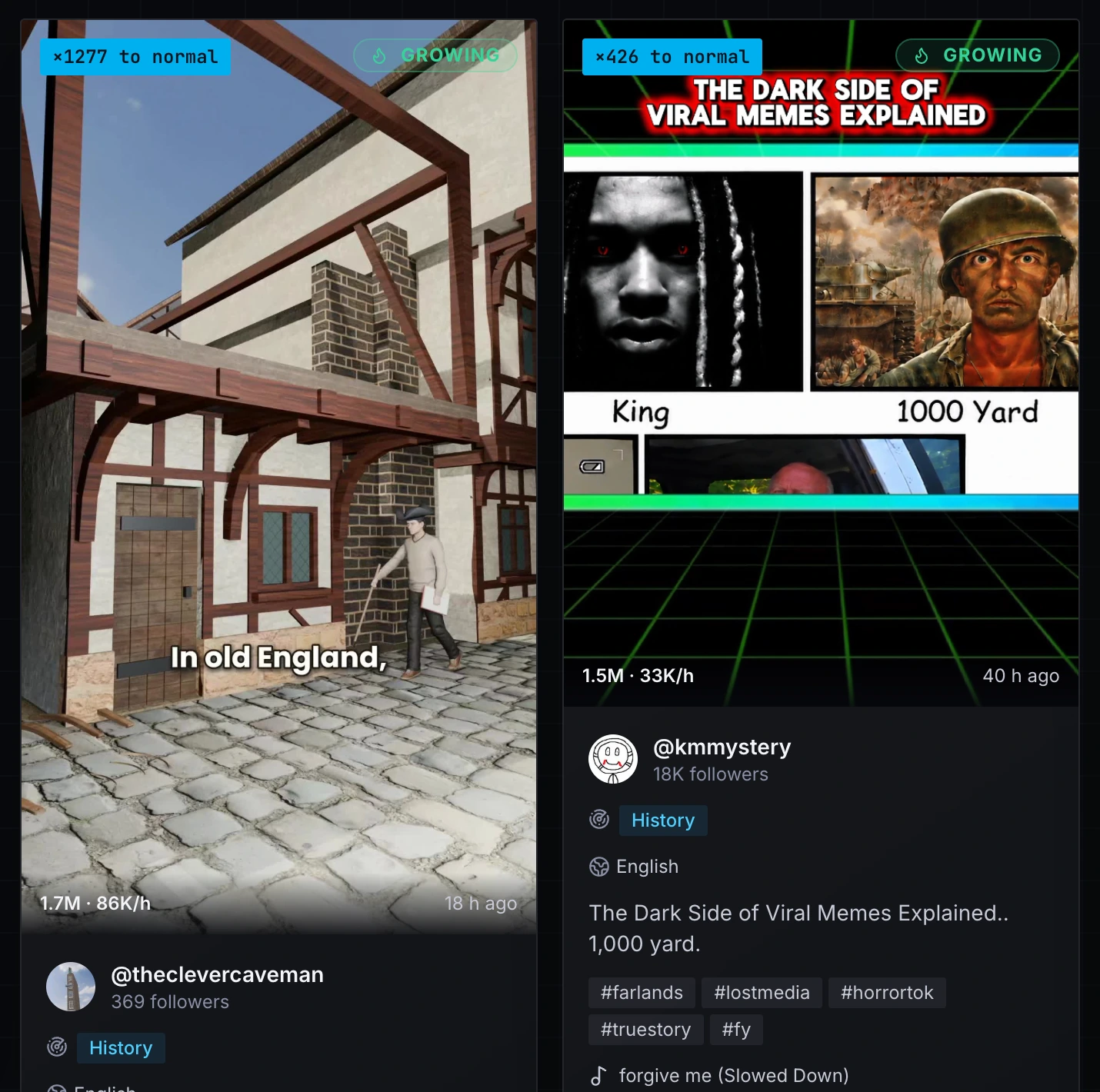
| Ground tax, so houses were built outward | @theclevercaveman | 305 | 1,600,000 | 85,927 | 1,277 |
| Dark side of viral memes: "1,000 yard" | @kmmystery | 17,300 | 1,300,000 | 32,572 | 426 |
| Dark side of viral memes: "king" | @kmmystery | 17,300 | 464,000 | 7,725 | 152 |
| WW2: "Imagine the fear" | @psychoscope0 | 1,271 | 137,400 | 2,612 | 12.3 |
| Why five countries were never invaded in WW2 | @stickman.timemachine | 10,600 | 282,600 | 6,338 | 9.8 |
In common: every video opens with one counterintuitive claim stated flat out, and all use original audio, not a trending sound. The two biggest breakouts came from accounts with 305 and 1,271 followers, so the format did the work, not the audience.
Idea for this week: a short series about an old tax that still shapes what a city looks like, such as the narrow canal houses in Amsterdam. Keep it to 25 to 35 seconds, put the hook in the first 2 seconds and announce it as episode 1.
How to read the numbers
The "times above normal" column is views divided by the median views of the account's earlier videos. The @kmmystery video at 426 got 426 times that account's usual result; in the dashboard it carries the badge "×426 to normal".
| Column | What it means | In the real run |
|---|---|---|
| Views per hour | Views divided by the age of the video | 85,927 for @theclevercaveman, an account with 305 followers |
| Growing | The video gained views faster since the previous scan | All five rows, because the request asked for it |
| Score | Grows with the ratio and views per hour; from the second scan it follows the speed between the last two scans, so a video that stalled drops | The order of the table |
Ways to change the request
You change the digest by changing the words of the message; nothing is set up again.
- YouTube Shorts instead of TikTok. Say "YouTube Shorts videos". TikTok is the default platform.
- One niche only. Name it: "only the History niche".
- Sort by speed. Ask for the videos with the most views per hour. The tool sorts by score, velocity or views.
- Add the sounds. Ask which sounds are behind the videos. Claude uses the third tool, "Trending sounds", over a window of 24, 48 or 72 hours.
- The same digest every Monday. Send the same message again each Monday, or each morning, and ask for the same columns.
What it costs
Reading trends costs no credits, in the dashboard and through the MCP server alike. What you pay for is the plan: Creator ($9 a month) watches 3 niches, Pro ($29) watches 10 and Business ($99) watches 30. An AI breakdown of a single TikTok video is paid in credits, and this digest does not use it.
What can go wrong
Most failures come down to the plan, an empty niche or the connector.
- You are on the Free plan. The tools answer that Trend radar needs a paid plan.
- The list is empty. You have no niches yet, or the niche has not been scanned yet. The first scan takes time.
- Claude did not use TrendGuru. Start the message with "Use TrendGuru" and check that the connector is on.
- The connection was revoked. Connect again as in Step 2.
Questions and answers
How do I find TikTok trends in my niche before they get big?
Watch the niche in TrendGuru's Trend radar and ask for the videos that are still growing. The radar keeps videos from accounts with 100,000 followers or fewer that got far more views than the account normally gets, and it scans every 6 hours.
Does a trend digest in Claude cost TrendGuru credits?
No, reading trends through the MCP server costs no credits. You pay for the plan: Trend radar is available on Creator, Pro and Business.
Can Claude post or change anything when I ask for trends?
The three Trend radar tools only read. Claude asks for permission before each tool and shows the parameters it chose, and you can press Decline.
Do I need an API key to connect TrendGuru to Claude?
No, Claude and ChatGPT sign in to TrendGuru with OAuth and no key is pasted. You paste the server address https://trend.guru/api/mcp, sign in and allow access.
How do I disconnect Claude from TrendGuru?
You can disconnect Claude at any time in the TrendGuru dashboard. Open Developers, then API keys, and remove Claude from the Connected apps list.
Try it on your own accounts
The Free plan gives 50 credits a month, no card. 1 credit = 1 post to one network.